Using the Build Planner to Improve Your DPS
Guides that just list "good" consoles or traits go stale the moment the game changes, and they can't tell you what is actually limiting your specific build. This guide takes a different approach: a repeatable process for finding out, using the Build Planner and Combat Log Reader together, that keeps working no matter how your build or the game itself changes.
Core stats that raise your DPS
Before changing anything, it helps to know what you're actually looking for in a weapon, console, or ability. A handful of stats do most of the work:
- Critical Chance is your odds of landing a critical hit. Every character starts with a base Critical Chance of 2.5%. The
[CrtH]weapon modifier and the Weapon Specialization skill both raise it directly. - Critical Severity is how much extra damage a critical hit deals once it lands. The base value is +50%, meaning a critical hit deals 150% of a normal hit's damage. The
[CrtD]weapon modifier and the Weapon Amplification skill both raise it directly. - Accuracy is compared against a target's Defense to determine whether an attack hits at all. Once your Accuracy Rating exceeds the target's Defense Rating, your hit chance caps at 100%, and any Accuracy beyond that point converts into a small bonus to Critical Chance and Severity instead. The
[Acc]weapon modifier raises Accuracy Rating directly. - Damage bonus is a straightforward multiplier on top of your base weapon damage. The
[Dmg]weapon modifier is the most direct source on a weapon itself. - Armor Penetration lowers a target's effective Damage Resistance Rating by the same amount, meaning your hits get through more of whatever resistance the target has, rather than raising your own damage output directly.
Weapons, consoles, traits, and abilities in Star Trek Online each deal a specific damage type (Phaser, Disruptor, Antiproton, and so on). Many tactical consoles, most notably the Fleet Spire's Vulnerability Locator consoles, boost Critical Chance for one specific damage type rather than damage in general. Sticking to one damage type across your weapons lets every one of those consoles benefit your whole loadout instead of just part of it.
None of this replaces actually testing your build. It's a starting point for what to look at when you're choosing between two items or deciding what to change next, which is what the rest of this guide covers.
Step 1: Build your loadout
Put together your ship, equipment, bridge officers, and traits in the Build Planner. If you already have a build saved, this can just be your current setup. Save it to a cloud slot or export it to a file so you have a clean starting point to come back to.
Step 2: Record a real fight
In game, type /CombatLog 1 in chat right before a fight, and /CombatLog 0 once it's over. Pick a fight you can repeat under similar conditions, since that's what makes a later comparison meaningful. Then upload the resulting log file to the Combat Log Reader. No log yet? Download the sample log used in this guide's examples, which is synthetic and not a real player's run, and upload that.
Step 3: Read what the log is telling you
The Combat Log Reader breaks a fight down several different ways. Each one points at a different kind of question:
- Damage by Ability shows exactly what's carrying your DPS and what isn't. If one ability you expected to matter is contributing far less than the others, that's worth a closer look, whether it's rarely coming off cooldown, missing a lot, or just not landing as often as you thought.
- Hit Breakdown shows your Critical, Flank, Normal, and Miss rates across the whole fight. A high miss rate or a lower than expected crit rate is a concrete, specific thing to investigate, rather than a vague sense that "damage feels low."
- DPS Over Time shows your output second by second. A big dip partway through often lines up with something specific, an ability on cooldown, a target you weren't hitting, or a lull in the fight itself, and it's a lot easier to spot on the chart than to remember afterward.
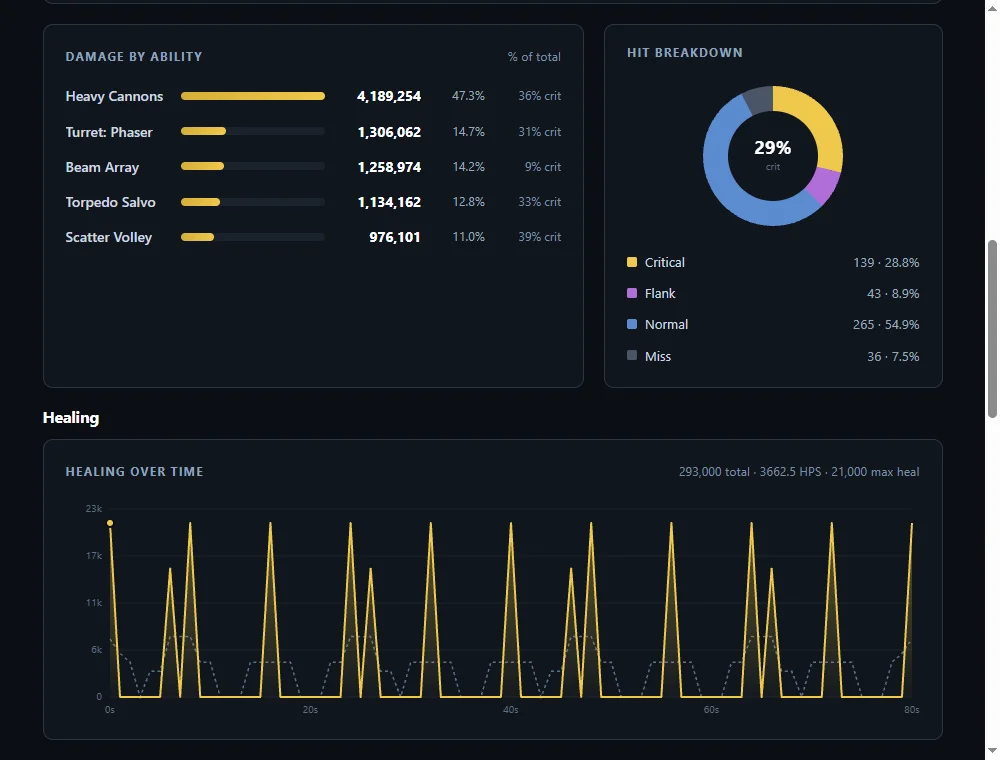
See How to Read Your Combat Log Results for exactly what every stat and chart means.
Step 4: Change one thing
Once you've found something worth investigating, go back to the Build Planner and change it: swap an ability, a console, a trait, or a piece of equipment. Change one thing at a time if you can. If you change several things at once and your DPS goes up, you won't actually know which change did it, or whether one change helped while another quietly hurt.
Step 5: Record again and compare
Repeat the same fight as closely as you can, record another log, and upload it. Compare the new numbers against your first log's results, especially the Damage by Ability and Hit Breakdown panels for whatever you changed. If you're signed in, you can save each version as its own build and record each log against it, so you always have both results to look back on side by side.
Sharing what you find
A saved build's recorded log stats show up on its public page when the build is shared, downloadable raw log included. That's real, verifiable performance data attached to a specific build, not just a claim, which is worth something a static list of "good" gear never can be. If you land on something that clearly helped, sharing the build lets other players see exactly what changed and what it did.
Still have a question this didn't answer? Tell us.